1.jpg)
Documents Required for IETM Development: A Complete Checklist for OEMs
You just won a defence contract. You open the SOTR (Statement of Technical Requirements) and see this line:
"The OEM shall deliver Interactive Electronic Technical Manual (IETM) Level 4 compliant with JSG 0852:2019 along with the equipment."
You call an IETM vendor. They say: "Great, just send us the inputs and we'll get started."
Then the real question hits:
What exactly are the inputs required for IETM development?
What documents does the vendor need, in what format and by when?
This is one of the most common questions we hear at Code and Pixels after 75+ IETM projects delivered to the Indian Army, Navy, Air Force, DRDO, BDL, BEL, ECIL, HSL, Many shipyards and drone manufacturer and private defense OEMs across India. Getting the right inputs to your vendor in the right format, is where IETM projects either run on schedule or slip by months.
This article gives you a complete, practical checklist of everything your IETM vendor needs from you, why each item matters, what format it should be in and what happens when something is missing or wrong.
What Does an IETM Vendor Actually Do with Your Inputs?
Before the checklist, you need to understand why the vendor needs documents in a specific way because this changes how you prepare them.
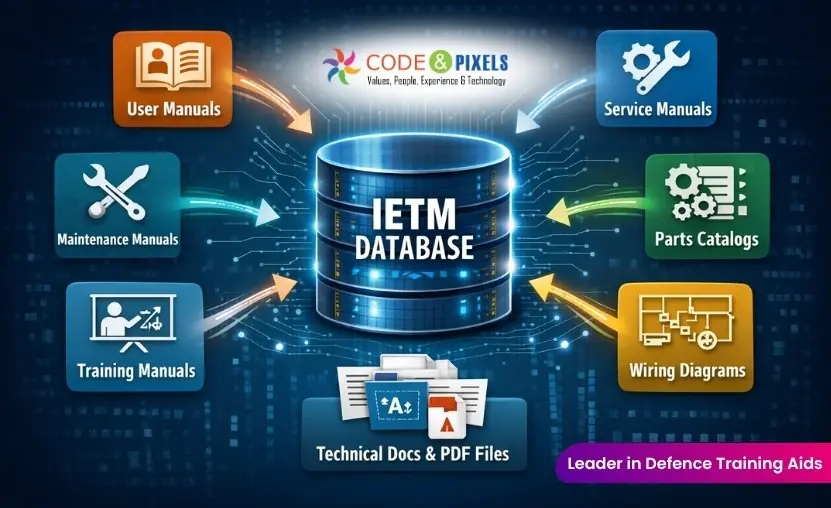
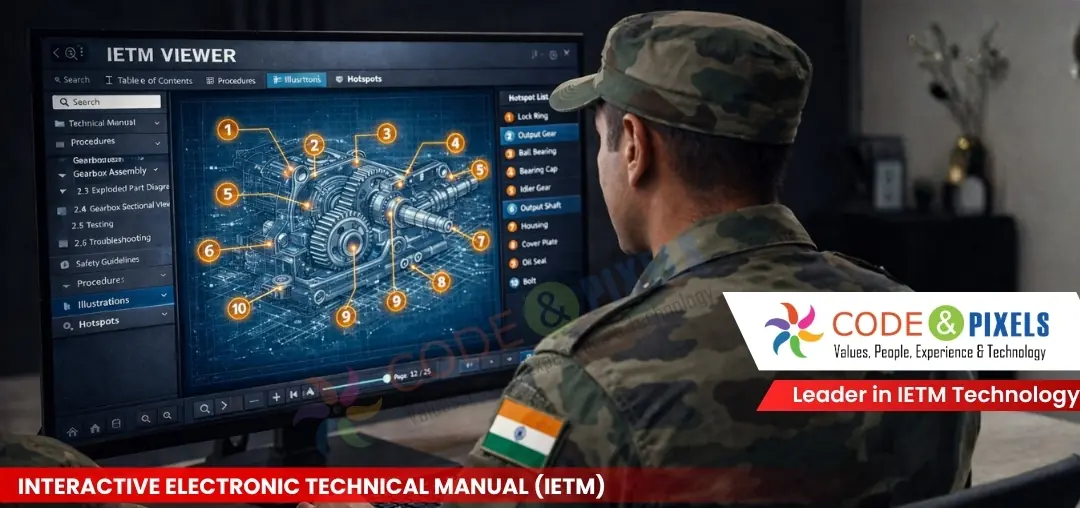
An IETM Level 4 is not a document. It is a web-based software application built on a relational database (SQL/MariaDB). Your vendor takes every manual, drawing, image and video you provide and rebuilds them from scratch inside a structured database using an authoring tool. The IETM Viewer software then reads that database and presents it interactively to the end user (Army, Navy, or IAF personnel).
This means your vendor is not simply importing a PDF. They are hand building your entire documentation set inside a database creating the table of contents hierarchy, hyperlinks between topics, hotspots on drawings, cross-references between manuals, user role filters and the global search index. Everything from scratch.
One poorly formatted document or one missing manual can stall the entire development. That is why the inputs you provide and how you provide them directly determines how fast and how smoothly your IETM gets built and accepted.
The Complete IETM Inputs Checklist:
1. Technical Manuals and Documentation (The Core Input)
This is the most critical category.
Without approved, complete and editable manuals, your IETM vendor cannot begin work. These are the documents that become the actual content of your IETM database.
Documents to provide:
- User Handbook (UHB) / Operator Manual — how end users operate the equipment. Mandatory for every IETM project.
- Technical Manual (TM) / Service Manual — detailed technical description of systems and subsystems.
- Maintenance Manual — scheduled maintenance, corrective maintenance and servicing procedures.
- Illustrated Parts Catalogue (IPC) / Illustrated Spare Parts List (ISPL) — all spare parts with part numbers, quantities and illustrations.
- A Manufacturer's Recommended List of Spares (MRLS) is a specialized inventory strategy for 2nd and 3rd year operations, designed to ensure equipment uptime after the initial warranty period. It typically includes critical components (bearings, seals), high-wear items (filters, belts) and high value strategic components tailored to specific equipment. Installation Manual / Diagnostics and Installation (DIM) installation, commissioning and diagnostic procedures.
- Troubleshooting Manual — fault codes, symptoms, probable causes and corrective actions.
- Man-Machine Interface (MMI) Manual — if the equipment has a display panel, software interface or HMI screen.
- Initial Stocking Guide (ISG) / Maintenance Scale (MS) — if applicable to your system.
- Safety Instructions and Precautions — warnings, cautions and notes integrated throughout the IETM.
The single most important rule:
Every manual submitted must be the final approved version, reviewed and signed off by the relevant authority (DGQC, MAG, or your internal technical approver). Drafts cause rework. If a document changes after IETM development starts, every page built from it has to be rebuilt.
Format requirements:
- Editable MS Word (.docx) is the best format, always share source files, not just PDFs.
- If submitting PDFs, they must be text-selectable and not scanned images.
- Scanned image PDFs (raster PDFs) are just pictures of pages. They cannot be converted to an IETM database directly and require additional OCR processing, which adds time and introduces errors.
- Files must be unlocked, no password protection, no copy restrictions.
2. Technical Drawings and Schematics
Drawings are what make an IETM genuinely interactive.
In IETM Level 4, the vendor creates hotspots on your drawings where an end user clicks a component number in the diagram and the IETM instantly jumps to the relevant topic in the manual. This bi-directional cross reference between drawings and content is one of the most valued features during acceptance trials.
Drawings to provide:
- Engineering drawings — assembly, sub-assembly and exploded views
- Wiring diagrams and electrical schematics
- Piping and instrumentation diagrams (P&ID) where applicable
- Block diagrams and system architecture diagrams
- Component location drawings (physical location of each part on the equipment)
Format requirements:
- High resolution PDFs
- Minimum resolution: 300 DPI for any drawing that users will zoom into in the IETM viewer
- Low resolution scanned drawings are a common rejection point during IETM acceptance trials, the acceptance team will flag blurry images immediately
- Drawings must be the final as built version not preliminary design drawings
3. Equipment Photographs and Images
Photographs help maintainers and operators identify physical components in the field especially important for maintenance procedures where someone needs to visually locate and confirm a part before working on it.
Images to provide:
- High resolution photographs of the complete equipment from multiple angles
- Closeup images of key components, control panels, connectors, LRUs (Line Replaceable Units) and assemblies
- Annotated photographs with call outs labelling component names and part numbers
- Before/after images for any assembly or disassembly steps, if available
Format requirements:
- JPEG or PNG format
- Minimum 150 DPI for standard display, 300 DPI preferred for zoomable views
- Provide original image files separately do not embed photographs inside Word documents only, as embedded images are often compressed and lose quality
- Do not use watermarked or confidential stamped images unless the IETM is for restricted internal use only
4. Multimedia - Videos and 3D Animations (If Available)
This is where many OEMs have a critical misconception that causes both confusion and delays.
An IETM viewer can play videos and 3D animations but it cannot create them. If your SOTR specifies videos or 3D animations as deliverables, those are separate training aids (often part of the CBT deliverable) not something your IETM vendor generates. If you have them, they can be embedded inside the IETM. If you don't, the IETM is built without them.
Provide if available:
- Training videos for operations, maintenance and assembly/disassembly sequences (MP4, H.264, minimum 720p)
- 3D animation files showing internal workings, component movements or exploded assemblies (MP4 or GIF for integration)
- Any existing 3D blowup or virtual model files if the vendor is also developing 3D content
- Exploded view animations produced for other purposes (brochures, sales demos, etc.) can often be repurposed for IETM integration
Note on file size: Large video files affect IETM loading time. Compress videos before providing them aim for the smallest file size that still maintains visual clarity at the screen resolution used.
If no multimedia exists and your SOTR doesn't specifically mandate it, discuss with your vendor whether it adds value or whether the IETM content alone fully meets the requirement.
5. Branding and UI Details
The IETM Viewer is customised with your OEM's branding. The Army, Navy or IAF personnel who use the IETM will see your company name and logo not the vendor's. This is a standard requirement under JSG 0852.
Provide:
- Company logo in high resolution
- Brand colours — primary and secondary hex codes
- Equipment name and model number exactly as it should appear in the IETM header
- Project name and nomenclature as per the SOTR or contract
- Any specific UI preferences dark or light theme, navigation panel layout, login screen background image
6. The SOTR / RFQ / Scope Document from Your End User
This is arguably the single most important document and the one OEMs most frequently forget to share with their IETM vendor.
Your vendor needs to know exactly what your end customer has asked for. Without the SOTR, the vendor builds to a general interpretation of JSG 0852 and the IETM then fails acceptance trials because a specific requirement was not met. This is entirely avoidable.
Share the full document and highlight:
- The exact IETM level required (Level 3 or Level 4)
- The applicable standard (JSG 0852:2019, S1000D, EED-S-048, DME 452, or NCD 1470)
- Number of IETM copies to be delivered (DVDs, USB drives, server installation)
- User roles required - Operator, Maintainer, Administrator
- Language requirements - English only or bilingual (English + Hindi)
- Specific features mentioned - annotations, bookmarks, offline access, LAN/server deployment, user activity tracking
- Any acceptance criteria or checklist provided by the end user
7. Your Point of Contact (POC) and a Subject Matter Expert (SME)
This is the most underestimated input on this list yet slow responses here are responsible for the majority of IETM project delays.
Nominate and introduce:
- One dedicated POC from your organisation who will be the single point of communication with the IETM vendor. They must be available to respond to queries within 24–48 hours. Projects with no clear POC are the ones that take 6 months instead of 3.
- One Subject Matter Expert (SME) - an engineer who worked on the system design or development who can answer technical questions about the equipment when the manuals are unclear, incomplete or contradictory.
- End user contact (if known) — name and contact at the Army, Navy or IAF unit responsible for acceptance, so the vendor can understand any unit specific preferences before the trial.
During IETM development, your vendor will constantly encounter gaps in documents unlabelled components, missing procedure steps, conflicting information between manuals. Without a responsive SME, development cannot proceed. This is not a process failure on the vendor's part it is a reality of technical documentation for complex systems.
8. Equipment Specific Reference Information
This supporting information fills gaps that documents alone often cannot answer, and helps the vendor build a more precise and useful IETM.
Provide:
- A complete hierarchical breakdown of systems and subsystems (even a simple tree diagram is valuable)
- Official nomenclature list — the exact, approved names for every component as they should appear in the IETM
- All part numbers and references for spare parts (cross referenced with the ISPL/IPC)
- Complete list of fault codes and error messages with plain language descriptions for the troubleshooting section
- Glossary of all technical terms specific to your equipment or domain
- Full list of abbreviations and acronyms used in your manuals with their expanded forms
Why Incomplete Inputs Are the #1 Cause of IETM Delays:
After delivering 75+ IETMs, the pattern is clear.
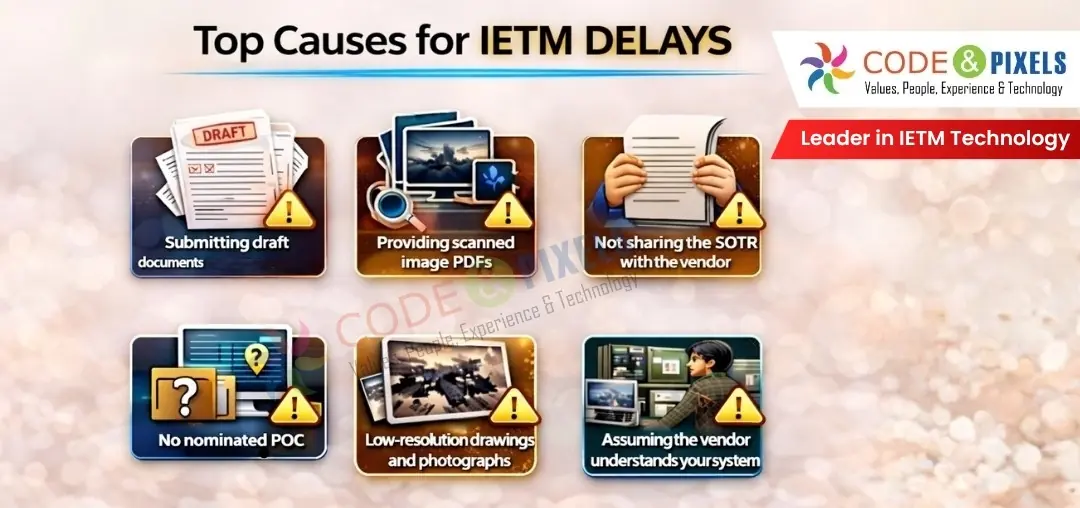
The most common causes of project delays, all traceable to the inputs stage are:
1. Submitting draft documents instead of approved finals.
If content changes after development starts, every affected page in the IETM database must be rebuilt. This is time consuming and chargeable. Always confirm final approval before submitting.
2. Providing scanned image PDFs.
A scanned page is a photograph of text not text itself. It cannot be converted to an IETM database without OCR processing, which takes additional time and is never 100% accurate. If source Word files exist, always share them.
3. Not sharing the SOTR with the vendor.
The vendor builds to what the end user has specified. Without the SOTR, they are guessing. Guessing leads to non-compliance. Non-compliance leads to rejection at trials.
4. No nominated POC.
Queries pile up. Decisions cannot be made. Development halts. A week without a response from the OEM is a week the vendor cannot work. Over a three month project, this compounds badly.
5. Low-resolution drawings and photographs.
Users zoom into drawings and images inside the IETM viewer. A pixelated or blurry image at full zoom is flagged by the acceptance team every single time. Provide the highest resolution you have.
6. Assuming the vendor understands your system.
Your IETM vendor is a documentation and software expert not an engineer for your specific system. They will not know what LRUs are critical, which fault codes are most common or what the end user's maintenance priorities are. Tell them. That context makes the difference between an IETM that passes first time and one that requires multiple revision cycles.
What Happens After You Submit All Inputs?
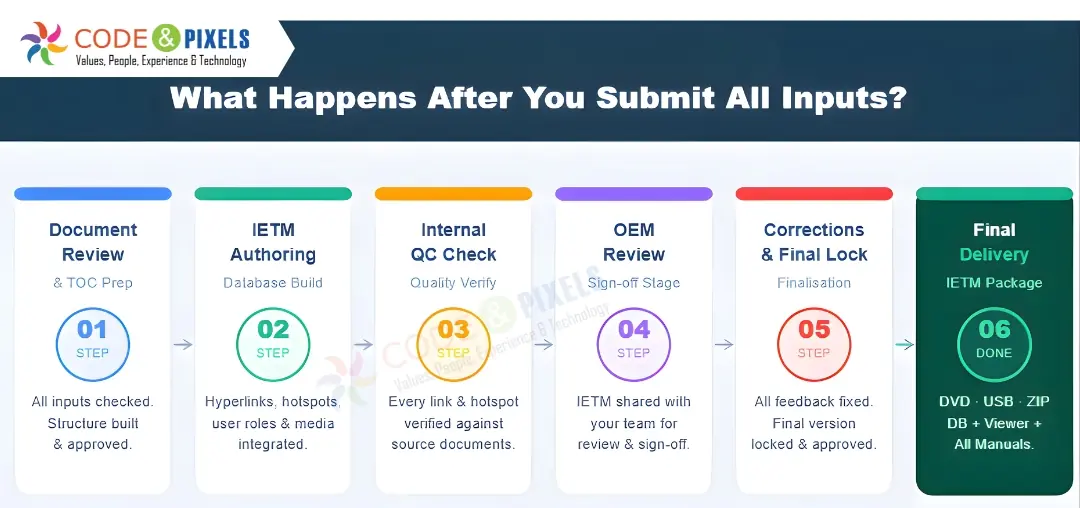
Once complete final approved inputs are received, the IETM development process follows these stages:
1. Document review and TOC preparation — the vendor reviews all inputs, creates the full table of contents hierarchy and gets your approval on the structure before building begins.
2. IETM authoring — content is entered into the IETM database using the authoring tool topics, hyperlinks, hotspots, cross-references, user roles, multimedia integration, drawings and glossary.
3.Internal QC — every topic, hyperlink, hotspot and function is verified against the original source documents. The checklist used during QC mirrors the acceptance checklist from the defence end user.
4. OEM review — a hosted or offline version of the IETM is shared with your team for review and sign off.
5. Corrections and finalisation — all observations are incorporated and the final version is locked.
6. Delivery — the IETM is delivered as a DVD/USB/ZIP package including the IETM database, IETM Viewer software, installation manual, user manual and administrator manual.
Quick Summary Checklist:
Print or share this with your project team before contacting your IETM vendor:
| S.No |
Input Required |
Preferred Format |
Ready |
| 1. |
All technical manuals — final, approved versions |
MS Word (.docx) / unlocked PDF |
☐ |
| 2. |
Engineering drawings and schematics |
High-res PDF (300 DPI) |
☐ |
| 3. |
Equipment photographs (all angles, components, LRUs) |
JPEG / PNG (min. 150 DPI) |
☐ |
| 4. |
Training videos (if available) |
MP4, H.264, 720p minimum |
☐ |
| 5. |
3D animation files (if available) |
MP4 |
☐ |
| 6. |
OEM company logo |
PNG, transparent background |
☐ |
| 7. |
Brand colours and UI preferences |
Hex codes / written brief |
☐ |
| 8. |
SOTR / RFQ / Scope document from end user |
PDF or Word |
☐ |
| 9. |
Nominated POC — name, phone, email |
Written introduction |
☐ |
| 10. |
Subject Matter Expert (SME) contact |
Name, designation, phone |
☐ |
| 11. |
Systems and subsystems hierarchy / breakdown |
Word / Excel / diagram |
☐ |
| 12. |
Official nomenclature list for all components |
Word / Excel |
☐ |
| 13. |
All spare part numbers (cross-referenced with ISPL) |
Excel |
☐ |
| 14. |
Fault codes and error messages with descriptions |
Word / Excel |
☐ |
| 15. |
Glossary of technical terms and abbreviations |
Word / Excel |
☐ |
Start Your IETM Project the Right Way:
At Code and Pixels Interactive Technologies, we have guided OEMs through this exact process since 2013. We have delivered 75+ IETM projects for the Indian Army, Navy, Air Force, DRDO, BDL, BEL, ECIL, HSL, BrahMos Aerospace and private OEMs including TATA, L&T, Mahindra Defence, IdeaForge, and many more.
We don't just build the IETM, we help you prepare from day one, review your SOTR, advise on inputs and guide you all the way through to acceptance.
If you've received a contract with IETM as a deliverable and want to understand exactly what's required or if you already have inputs ready and want to get started contact our team today.
Learn More or Request a Demo
Website: www.codeandpixels.net
Email: ietm@codeandpixels.net
Phone: +91 98495 27706
 |
GOPI KRISHNA GUDIVADA Leading the R&D and Project divisions at Code and Pixels and Digital Teacher, driving innovation in e-learning, IETM software, and Defence documentation solutions. With 23 years in content development and 15 years in Defence technical documentation, I bring deep expertise in designing and implementing IETM solutions aligned with JSG 0852 and S1000D standards. Passionate about creating world-class digital training systems for the Indian Armed Forces and advancing the standards of e-learning in India.    |
____________________________________________________________________________________________________________________________________
Frequently Asked Questions
1. What are the inputs required for IETM Level 4 development?
IETM Level 4 requires finalized manuals, drawings, images, SOTR and structured reference data.
- Approved manuals (UHB, TM, IPC, etc.)
- Drawings (300 DPI) and equipment images
- SOTR or scope document
- POC & SME contacts
- Nomenclature , fault codes, glossary
2. Can scanned PDFs be used for IETM development?
Scanned PDFs can be used, but they are not recommended. Since they are image-based, they require OCR processing, which can introduce errors and increase development time.
For better accuracy and speed, always use editable Word files or text-selectable PDFs.
3. How do I choose the right IETM vendor?
Choose an IETM vendor with proven defence experience, process clarity and understanding of SOTR requirements.
- Experience with JSG 0852 / defence projects
- Clear development workflow and timelines
- Ability to handle Level 4 database-driven IETMs
- Strong support during review and acceptance trials
A qualified vendor reduces risk of rejection and project delays.
4. What happens if documents are revised after development starts?
If documents are revised after development begins, rework is required across the IETM database. It affects multiple linked sections , requires rebuilding content and can delay project completion. Always submit final approved documents before starting.
5. How do I know if my inputs are ready for IETM development?
Your inputs are ready when all documents are final, approved and properly formatted.
- No drafts or revisions pending
- Editable or text-selectable files
- High-resolution drawings/images
- SOTR available
- POC & SME assigned


